GarageBand
A music creation software...
GarageBand is a music creation software for Mac OS X and iOS. It is developed by Apple Inc. GarageBand is included as part of iLife application suite (also including iPhoto, iMovie, iDVD, and iWeb) intended to simplify the creation and organization of digital content. After the launch of Apple's Mac App Store, GarageBand is made available on Mac App Store independently.
GarageBand – At a glance…
GarageBand is perhaps the most successful entry-level music making application which has introduced many people to computer-based music production. GarageBand is the small brother of Apple's professional Digital Audio Workstation - Logic. With GarageBand, you can record, arrange, and mix your music, and share it with the world. It does not matter what is the level of your musical knowledge, GarageBand helps you to unleash your musical creativity. GarageBand puts a complete recording studio, with pro-quality instruments and effects and lets you make your own music whether you are a professional or beginner or have never played anything.
User Interface, features and workflow
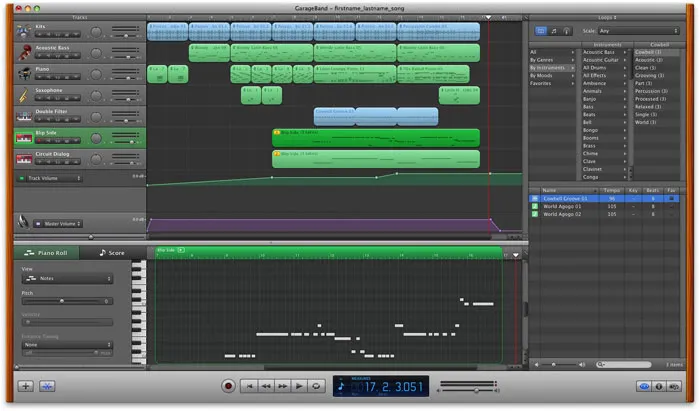
Compared to other professional music creating applications, GarageBand is very easy to use. There are many elements that make this application a very remarkable piece of software. The GarageBand window includes the timeline, the loop browser, the editor, and the Track Info pane. You record instrument, arrange regions, and mix your projects in the timeline, find and preview loops in the loop browser, and change instrument, effects, and input settings in the Track Info pane. To quickly start creating songs, GarageBand includes a Loop browser. The loop browser lets you quickly search for loops to add to your projects. You can find loops using keywords for instrument, musical genre, or mood. You can also preview loops in the loop browser before you add them to a project.
Working with audio...
When you create a 'New Project' in GarageBand, you will be prompted to choose from many existing templates. You can add or remove tracks in your project. Tracks are used for placing audio, software instruments or loops. GarageBand allows you to record audio from microphone or a musical instrument. You can use built in audio filters based on AU (Audio Unit) technology to apply various effects on your audio track like equalization, reverb, echo, dynamics, modulation, distortion, guitar stomp boxes and effects processors. You can add automation curves to tracks in GarageBand, including the master track, and use them to create volume, pan, and other changes
Virtual software instruments
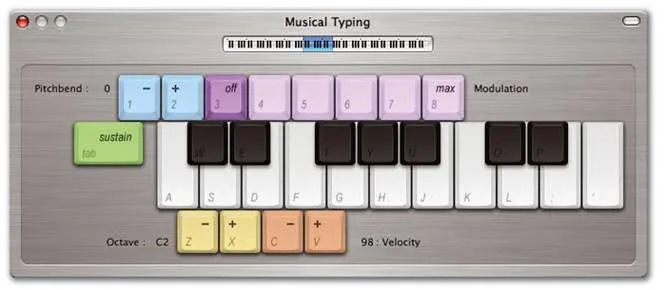
GarageBand includes an extensive set of Software Instruments, including drums, guitars, pianos, organs, and synthesizers, that you can use in your projects. You can play these instruments using a MIDI-compatible music keyboard connected to your computer or an on-screen computer keyboard available inside GarageBand. You can add effects to a Software Instrument and edit Software Instrument regions in the editor.
Working with MIDI…
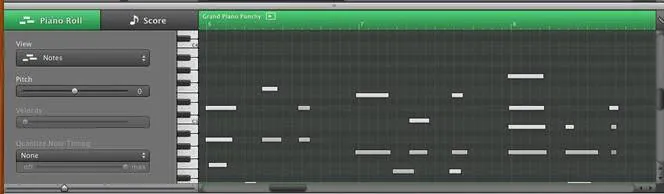
GarageBand comes with a piano roll to record, view and edit MIDI data. You can edit individual notes in Software Instrument regions, fix the timing of notes, transpose and rename regions. GarageBand can import MIDI files. You can assign any software instrument to the tracks of imported MIDI files. Pitch slider in the piano roll can be used to control the pitch of the software instrument. Volume slider can be used to control the velocity of individual notes. Although GarageBand offers comprehensive features for MIDI editing, it lacks several features found in professional DAWs.
Working with Music Notation…
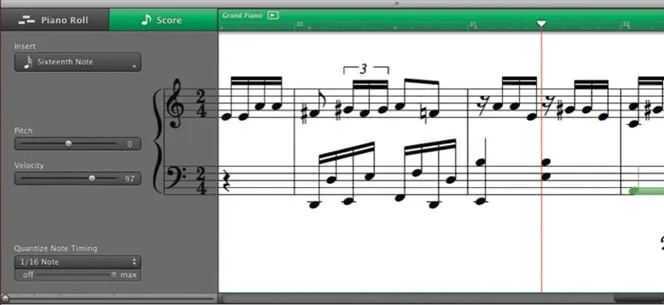
For those who are musically literate, in addition to the editor’s graphic “piano roll” view, Software Instrument regions (both those you record and those from loops) can be viewed and edited in notation view. In notation view, the notes in a region are shown as musical notes. Notation view includes other musical symbols such as rests, staves, clef signs, time signatures, key signatures etc.
Apple Loops
One aspect of GarageBand which makes it very famous is making music with audio loops. GarageBand comes with a large collection of Apple Loops. Apple Loops are prerecorded musical phrases in a variety of genres, instruments and moods that you can add to your projects. You can create complete songs by choosing from hundreds of available Apple Loops. You can add loops for the drums, and then add loops for bass and other rhythm parts, apply different effects on them and create the base for your project. On top of that you can add different software instruments or record vocals and other instruments. You can always extend your loop library by purchasing Apple's Jam Packs which are contains loops and software instruments grouped into certain genres and styles or other commercial loops available out there.
Arranging and Mixing
Once you are done with your recording and adding loops to your project you can build a proper arrangement of them in GarageBand's timeline. You can arrange the regions of audio and MIDI in the timeline by cutting, copying, and pasting them; by moving, resizing, and looping them; and by splitting and joining them. In addition to arranging audio and MIDI regions in timeline, you can arrange and edit them in the editor. GarageBand supports basic mixing features. Although it does not support comprehensive mixing features as of an advanced DAW like Logic but you can mix tracks in your project to balance the volume and pan, add a fade out at end , add and adjust track effects, graphically edit the Visual EQ effect and automate mixing and other parameters.
Before summarizing let us look at the pros and cons of this application.
Pros…
- Simple and easy to use
- A new feature included with GarageBand '09 and later is the ability to download pre-recorded music lessons from GarageBand's Lesson Store for guitar and piano.
- Thousands of Apple Loops are included.
- Supports basic music notation.
- Many software instruments are included. Library can be extended by third party virtual software instruments designed especially for GarageBand
Well, GarageBand is not a professional DAW with all the advanced features, here are a few things which are missing from GarageBand.
Cons…
- A lack of MIDI-out capability limits the use of external MIDI instruments.
- GarageBand lacks a proper mixer. This makes GarageBand very less useful for advanced mixing.
- Lacks multiple MIDI channel support. So, multi-timbral instruments which contain multiple channels and respond to many MIDI channels, such as Native Instruments Kontakt and MOTU MachFive, are not ideally suited for use in GarageBand.
- GarageBand cannot export MIDI files. MIDI sequences edited or created in GarageBand cannot be exported to other DAWs or programs without first being converted to audio.
Overall, GarageBand is a fantastic loop-based, drag-and-drop music creation tool designed explicitly for beginners. But also musicians who want to record themselves, GarageBand is a go-to application for them. It is a tool which allows everyday computer users to create their own songs, quick and simple. To many music lovers and creators, this application is a dream comes true.

Created by
Giancarlo is a musician (teaching guitar since 2000), software engineer, AI consultant and published researcher
FAQ
What is GarageBand and how can it help a guitarist create music?
GarageBand is Apple's user-friendly music creation software available for Mac and iOS devices. For guitarists, it functions as a comprehensive recording studio where you can record your guitar, integrate virtual instruments like drums or bass, organize different musical sections, apply various effects (including specific guitar stomp boxes), and mix your compositions, all without needing extensive prior musical expertise.
Can I record my actual guitar playing in GarageBand, and what kind of effects can I add to it?
Yes, GarageBand allows you to record live audio by connecting your guitar directly or using a microphone. After recording your guitar, you can enhance its sound by applying various built-in audio filters based on AU (Audio Unit) technology. These include common effects like equalization, reverb, echo, and dynamics, as well as guitar-specific options like distortion and stomp boxes.
What are 'Apple Loops' and how can a guitarist use them to build a song in GarageBand?
Apple Loops are pre-recorded musical phrases provided with GarageBand, spanning various instruments, genres, and moods. As a guitarist, you can easily use these loops to quickly establish a rhythmic foundation for your songs. For instance, you could add drum or bass loops, and then record your own guitar parts, integrate software instruments, or add vocals on top of this established groundwork.
What is the difference between recording my real guitar and using 'software instruments' in GarageBand?
Recording your real guitar involves capturing its actual sound directly into GarageBand, typically through an audio interface or microphone. 'Software instruments,' conversely, are virtual instruments (such as pianos, drums, or synthesizers) built into GarageBand. You play these using a MIDI-compatible keyboard or the on-screen keyboard, and their sounds are generated digitally within the software, allowing for flexible editing of individual notes.
Does GarageBand offer any features to help me learn or visualize guitar music?
Yes, GarageBand includes a feature that allows you to download pre-recorded music lessons, including specific lessons for guitar. Additionally, for any software instrument parts you create or record, GarageBand provides a 'notation view.' This displays your music using standard musical notation, showing notes, rests, staves, clef signs, and other symbols, which can be very beneficial for understanding and visualizing your compositions.
What are some limitations of GarageBand that a developing guitarist or musician might eventually encounter?
While excellent for beginners, GarageBand does have certain limitations. It lacks some advanced features found in professional DAWs, such as comprehensive mixing capabilities and support for multiple MIDI channels, which can be restrictive when working with complex virtual instruments. Also, GarageBand cannot directly export MIDI files; they must first be converted to audio if you wish to transfer them to other music software.